Posts

Linux Mint

Recently I discovered Linux Mint. So far my experience with it has been pleasant. It runs way faster than the Windows 7 that was previously installed on the same box.   I actually installed this on a loved one's box and and since she is not a savy computer user I figured I would install everything she needed to make her experience pleasant.  I really didn't know what I was getting me and her into but I decided to give it a try because her computer was running extremely sluggish.  She mostly uses it for web navigation, so she had no files to backup and she doesn't rely on any Windows app for work or entertainment - so this made the decision much easier. So far she is quite pleased with the experience.  The only thing I did to the OS so far was add Google Chrome because FireFox for some reason does not appear to be as good as Chrome on Linux or even as good as FireFox on Windows.  One of the key features failing in FireFox on LinuxMint is that the address b...
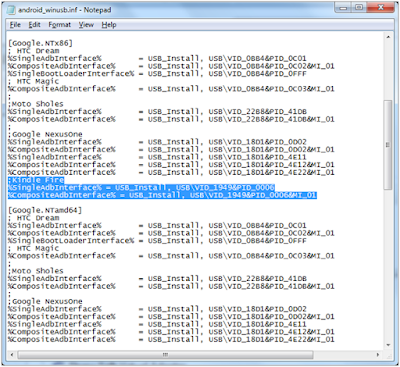
Turning On Debugging on Kindle Fire Device

Image
Having recently purchased a Kindle Fire and also because I recently started learning how to program games for Android I decided to see if my play projects would run on the Kindle Fire.   Much to my dismay there was no “Allow Debugging” setting on the Kindle Fire like there is with my DroidX phone.  Also my Kindle Fire was not recognized by my Eclipse IDE as a device.   After hunting for an answer I found how to do just that from information on the following links http://forum.xda-developers.com/showthread.php?t=1348052 http://blog.actlocalmedia.com/2011/11/developing-on-kindle-fire.html In the first link you will find a post by AdmiralUD that outlines the entry you must make for the Android drivers.   Because I had to piece meal the solution on my own and because it was somewhat confusing at first, I decided to share a more comprehensive solution to the problem. I will caution you that before you start developing on the Android you wi...

Turning On Debugging on the DroidX for Android Development

I started playing around with Android development yesterday.  I was able to follow all the setup instructions to run my initial program from the emulator.  However, when I tried to run my program from the actual device (I have a DroidX by Motorola) I ran into some issues because it was not being recognized.  That's when I colleague pointed me to a setting in the phone itself.  It turns out I had to allow debugging.  To allow debugging on your DroidX just navigate to Settings/Applications/Development. Once there turn on USB Debugging. Once I turned it on I was able to run my Hello World app on my device. If you are interested in the book I am learning from you can get it at Amazon http://www.amazon.com/Beginning-Android-Games-Mario-Zechner/dp/1430230428 . Or if you have a Safari account you can read it online like me.

Simple Example of Using Pipes with C#

Image
So I decided to dig into understanding how Asp.net works under the hood, out of curiosity.  In the articles that I found the authors described the architecture in lower level details.  One of the things that caught my eyes was the use of named Pipes as a means of inter-process communications by the architecture.   So I decided to dig into that portion a little bit deeper.  I discovered that the .Net framework has a namespace for named pipes and it's quite easy to use. I intend to demonstrate a small example that I cooked up rather quickly by setting up a named pipe server and then connecting a pipe client to it.  Before I do that, I want to say as a disclaimer that I don't know that this example demonstrates the best way to use pipes.  What it does do is show the most straightforward way to use them.  Also, before you use pipes you should consider using something else like WCF instead if you need well defined interfaces, as using pipes is pretty...

DirectoryWiz an Open Source Framework for Cleaning Folders

 I have started work on something that has been brewing in my mind for some time.  I have created a framework to enable me to clean folders of undesired folders and files.  For example say I want to remove all the .svn folders from my solution to save space and archive somewhere.  Or maybe I want to remove the bin and debug folders so that I can zip and mail out the solution. I primarily wrote it as a tool for myself.  The primary purpose of this framework is to clean folders of undesired files and folders, such as cleaning the bin and obj folders from your solution.  It is also to aid in copying folders and folder trees.  This is in effort to get around the faulty windows copy system that chokes on the first error.   Anyway, I'd be interested in hearing your thoughts.  If you have some time please visit the git link below and read ReadMe file on the site.  If you have more time than than that, go ahead and download the source code. ...

Evaluating Mercurial as a posibble DVCS as opposed to Git

As some of you might know, lately I've been searching for a new tool to use as a version control system.  Currently for my job we still use Subversion.   In many ways we have outgrown it or at least we realize that we can take advantage of some of the capabilities of a distributed version control system (DVCS) - like disconnected operations, redundant backup repositories, better performance.  To allow us to meet our team's needs we need keep a workflow similar to what we have with subversion - many clients and one master host or central repository.  I have not gone through the the process of setting up a git repository on the server - but it looks like a real headache.  It seems that even setting up a normal local file repository is a challenge.   A local file repository would be insufficient because we cannot control security with that anyway.   However to go through the whole process of setting up Git with SSH, it feels like I'm tryi...

Learned about the :hidden filter today

It seems that the more I dig into jQuery the more I realize how vast a library it is.   Also noticed that much of the CSS3 stuff is bleeding off into jQuery territory, but that is a topic for a different day. I am currently reading the book jQuery in Action .  I am only in Chapter 2 and I've been reading it for about two weeks... sigh.  That should give you an idea of how long it's taking me to tackle the jQuery topic. The topic of this post is to demonstrate how with my new knowledge of the ':hidden' filter I was able to reduce some code. I basically went from multiple methods and dynamically adding a CSS class to the latter example marked 'TO simply this' below. //From this var checkIfIsExpanded = function(){                                           ...